AI Creative Builder — Visuals That Stop the Scroll
AI ToolsAd Creatives~20 min
VORTEX — Creative Reviewer
Aurelius wrote the copy. Now you build the visuals. Vortex reviews your creative mix to make sure you have enough diversity before you spend a dollar. This lesson: how to build ad creatives with AI tools — fast.
You don't need a graphic designer. You don't need Photoshop. AI tools + Canva + your swipe file = 15-25 unique ad creatives per client in under an hour.
Outperforms static 9 out of 10 times. Hook in first 2 seconds. Show the product. End with CTA.
Tony's: Close-up of dough being tossed → cheese stretching → delivery at door → family eating → "$12.99" text card
TRUST BUILDER
🤳
UGC-Style
Looks like a real person filmed it on their phone. Not polished. That's the point — it feels authentic in the feed.
Tony's: Someone filming themselves opening the pizza box: "Yo I just found this place and... are you serious right now? This is $12.99??"
CONVERSION
↔️
Before / After
Split-screen or swipe comparison. Extremely powerful for services (dental, fitness, cleaning, landscaping).
Tony's: Left side: sad microwave meal, grey lighting. Right side: Tony's pizza on a nice table, family laughing. Same person, different dinner.
ENGAGEMENT
😂
Meme / Relatable
Humor + relatability = shares + saves. Doesn't look like an ad. Gets organic reach on top of paid.
Tony's: Drake meme format — "Cooking after work" (nah) vs "Tony's at the door in 20 min" (yeah). Caption: "You know the vibe 🍕"
Vortex's rule: every client needs at least 4 of these 6 formats. Not 15 single images. Not 10 videos. A MIX. The algorithm needs variety to test what resonates with different audience segments.
📐 3. Dimensions Cheat Sheet
Every ad you make gets exported in two sizes. Always. No exceptions.
1080 × 1080
Square (1:1)
Feed posts
FB FeedIG Feed
+
1080 × 1920
Vertical (9:16)
Stories & Reels
StoriesReels
=
2x
placements
Maximum Reach
Every ad, both sizes
🖥️SHOW ON SCREEN: In Canva, show how to create both sizes. Start with 1080x1080, duplicate, resize to 1080x1920. Takes 30 seconds.
🛠️ 4. Your Tool Stack
You only need 3 tools. All free or cheap. No Photoshop, no After Effects, no design degree.
🎨
Canva
BUILD THE FINAL AD
Templates, drag-and-drop, brand kits. This is where you assemble the final ad — add text overlays, CTAs, export both sizes. 80% of your creatives get finished here.
Free plan worksPro = $13/mo
🎬
CapCut
VIDEO ADS
Free video editor. Auto-captions, transitions, templates. Turn stock footage + text into scroll-stopping video ads. Mobile and desktop.
Free
🤖
Claude
CONCEPTS + SCRIPTS
Generate image descriptions, video scripts (hook → body → CTA), carousel storylines, and creative concepts. Feed it your angles from 3.8.
Free plan works
🍌
NEW — FEB 2026
Gemini (Nano Banana 2)
SKETCH → DESIGN
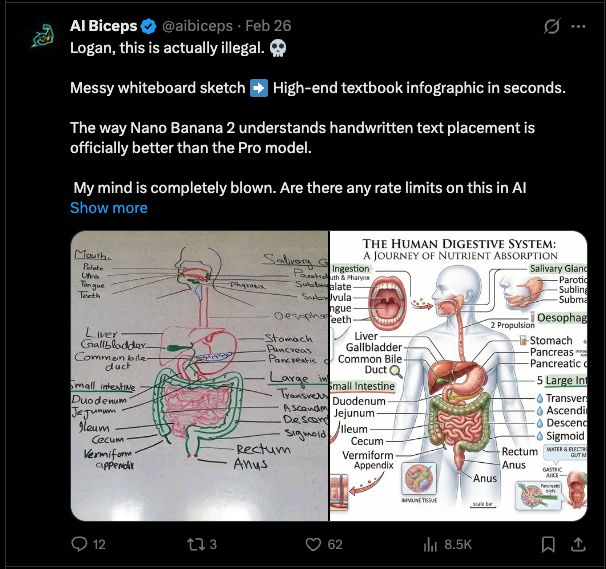
Google's new image model. The killer feature: sketch an ad on paper, take a photo, and it turns your sketch into a professional design. Also generates images from text descriptions. Best image model available right now.
Free via AI Studio
🍌 NANO BANANA 2 — Sketch to Professional Design in Seconds
Sketch your ad idea on paper → take a photo → Nano Banana 2 turns it into a professional design. Client has no photos? No designer? Doesn't matter. You can literally draw what you want the ad to look like and AI builds it. This is the workflow: Sketch idea → Nano Banana generates the image → Canva assembles the final ad with text + CTA.
🖥️SHOW ON SCREEN: Sketch a simple pizza ad on paper (or whiteboard). Take a photo. Upload to Google AI Studio. Show the output. Students will lose their minds.
🏪 5. Niche Creative Templates
Different businesses need different creative styles. Click each niche to see the playbook:
🖥️SHOW ON SCREEN: Click through 2-3 niches. For each one, open Canva and show a template that matches. Point out the visual style differences.
🍕 Restaurant
🦷 Dentist
💪 Gym
🏠 Real Estate
🧹 Home Services
Restaurant / Food — Tony's Pizza Example
📸 WHAT TO SHOOT
Close-up food shots (cheese pull, steam, toppings). Real kitchen footage. Delivery moment (door opens). Happy customers eating. The chef making food.
🎨 VISUAL STYLE
Warm colors (orange, red, yellow). Dark backgrounds make food pop. Big price/deal text. Show the food FIRST — not the logo. Natural lighting.
🏆 TOP PERFORMING FORMATS
1. Video of food being made (UGC style) → 2. Carousel of menu items → 3. Single image with deal overlay → 4. Before/after (empty table → full pizza spread)
Dental — Smile Transformation
📸 WHAT TO SHOOT
Before/after smile photos (with permission). Clean office shots. Friendly staff. Patient testimonial videos. The dentist explaining procedures in plain English.
🎨 VISUAL STYLE
Clean whites and blues. Trust-building visuals. Show real people, real smiles. Avoid sterile/clinical look — make it warm and welcoming. Big clear offer text.
🏆 TOP PERFORMING FORMATS
1. Before/after smile carousel (HUGE engagement) → 2. Patient video testimonial → 3. "New patient special $99" single image → 4. Doctor explainer video (builds trust)
Gym / Fitness — Get In Shape
📸 WHAT TO SHOOT
Real members working out (not models). Transformation photos. Community moments (group classes, high fives). Clean facility shots. Trainer explaining exercises.
🎨 VISUAL STYLE
Bold, high energy. Dark backgrounds with bright accent colors. Action shots with motion blur. Strong typography. Show effort AND results. Avoid intimidating vibes for general gyms.
🏆 TOP PERFORMING FORMATS
1. Transformation video (before/after with story) → 2. Workout clip UGC → 3. "First week free" offer image → 4. Member testimonial carousel
Real Estate — Dream Home
📸 WHAT TO SHOOT
Property walkthrough videos. Neighborhood highlights. "Just listed" / "Just sold" graphics. Agent on camera giving market tips. Drone shots of the area.
🎨 VISUAL STYLE
Aspirational but attainable. Bright, clean photos. Show the lifestyle, not just the house. Price and location front and center. Professional but not corporate.
🏆 TOP PERFORMING FORMATS
1. Property walkthrough video (15-30s) → 2. "Just listed" carousel with room photos → 3. Market update single image → 4. "Homes under $X in [area]" lead ad
Home Services — Before/After Gold
📸 WHAT TO SHOOT
Before/after transformations (the #1 format). Time-lapse of work being done. Satisfying cleaning/pressure washing videos. Happy homeowner reactions. The truck/team arriving.
🎨 VISUAL STYLE
Raw and real beats polished. Phone footage > professional shoots. Split-screen before/after is king. Price + service area in bold. "Before" side should look genuinely messy.
🏆 TOP PERFORMING FORMATS
1. Before/after side-by-side (INSANE engagement) → 2. Satisfying time-lapse video → 3. "$99 first clean" offer image → 4. Homeowner reaction UGC
⚡ 6. The 45-Minute Creative Build
This is the exact process to go from zero creatives to 15-25 ready-to-upload ads in under an hour:
🖥️SHOW ON SCREEN: Walk through this process live. Build 2-3 creatives in Canva as you explain. Show the Claude prompt for video scripts.
1
Pull angles from 3.8 — 5 min
Open your Aurelius output from lesson 3.8. You already have 12 ad copy variations with different angles. Each angle becomes a creative.
2
Check your swipe file — 5 min
Open your swipe file. Find formats that match this client's niche. A restaurant? Look at food ads you saved. A gym? Pull those transformation formats. Don't reinvent — adapt.
3
Build 8-10 static creatives in Canva — 20 min
Use templates. Swap text to match your copy. Use client's photos or stock. Export both sizes (1080x1080 + 1080x1920). Mix: 4 single images, 2 carousels, 2 before/after.
4
Build 3-5 video creatives — 15 min
Ask Claude for 15-second video scripts (hook → body → CTA). Use client footage, stock footage, or screen recordings. Edit in CapCut. Add captions and music. Done.
5
Run through Vortex checklist — 5 min
Use the diversity checker below. Make sure you have enough variety in formats, angles, and visual styles. If Vortex says you're short, go back and add more.